Stadium Perimeter LED Display Maintenance Guide: A 12-Point Annual Checklist for Venue Operators
Stadium perimeter display rings don’t fail dramatically — they fail through incremental neglect. This guide breaks down the 12 maintenance checks that keep a stadium perimeter LED system, broadcast-ready, safe for athletes, and running at full brightness across an entire 8–10 year service life.
You spent six figures on a stadium perimeter display ring. It ran flawlessly for the first season. Then, somewhere in year three, you notice a 12-meter section that’s 15% dimmer than the rest of the ring. A sponsor complains their logo looks washed out on camera. Your ops team spends two hours tracing a “dead section” that turns out to be a loose waterproof connector — not a dead module.
This is how stadium perimeter LED systems fail: not dramatically, but through incremental neglect. And the fix isn’t better hardware. It’s a maintenance schedule that treats the perimeter ring as what it actually is — an outdoor electrical system exposed to rain, UV, athlete impact, and broadcast cameras, not just a screen.
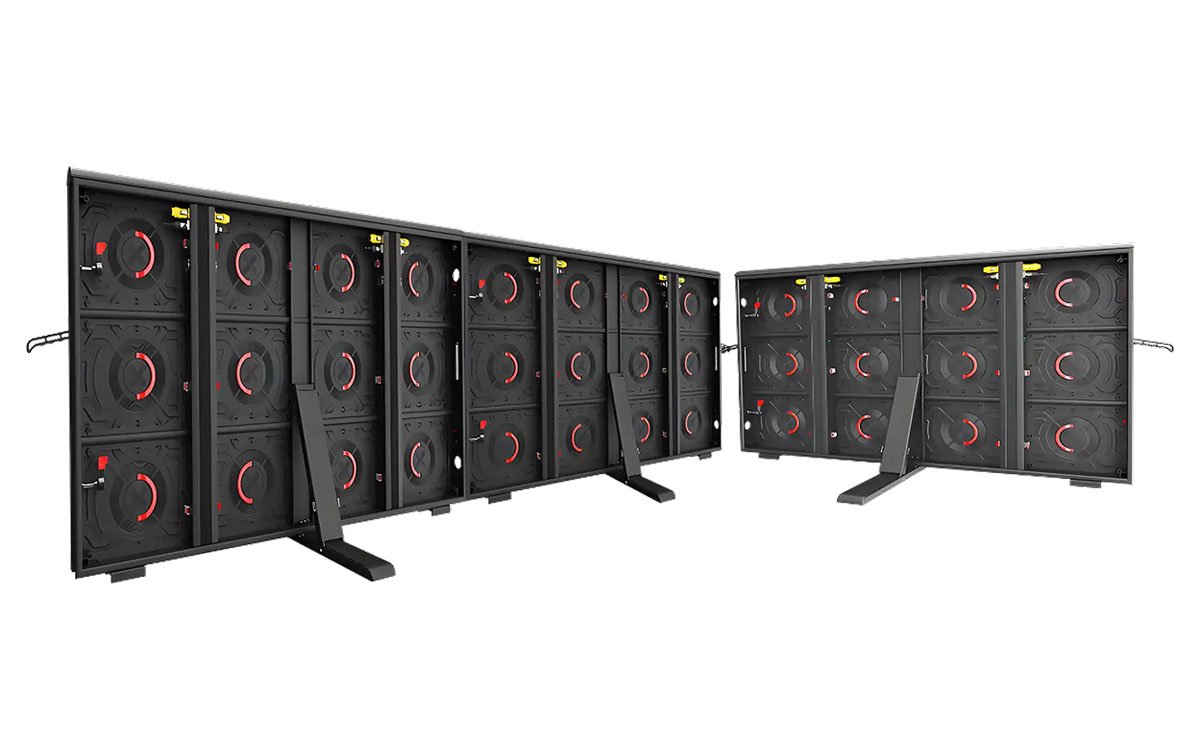
Why Stadium Perimeter LED Display Maintenance Is Different from Any Other Display
A stadium perimeter display system and product lives in the worst possible position: at pitch level, within athlete reach, fully exposed to weather, and directly in the line of fire for broadcast cameras running at 1/1000s shutter speeds. This combination creates four unique failure vectors that don’t apply to a standard outdoor billboard:
- Physical impact: Athletes collide with the ring. Soft masks and rubber edges absorb energy — but they wear out. A hardened or torn mask is both a safety hazard and a visual defect.
- Ground-level moisture and splash: Rain doesn’t just fall on a stadium perimeter display ring. It splashes up from the pitch surface, carrying grit into seals and connectors.
- Broadcast exposure: A 3% brightness drop across one cabinet row is invisible to the eye but clearly visible on a slow-motion replay. Camera calibration drift is your early warning system.
- Continuous event cycles: A stadium hosts football, concerts, rugby, and community events. Each changeover means power cycling, content reconfiguration, and physical stress on the mounting structure.
The 12-Point Annual Maintenance Checklist
The following checklist is derived from venue deployment records and IEC/EN standards for outdoor electronic display systems. Each point maps to a specific failure mode observed in live stadium environments.
IP65 Seal Integrity — Every 90 Days
IP65 is a rating, not a permanent state. The gasket between module and cabinet, and the seal between cabinet and frame, degrade under UV and temperature cycling. Inspect all seals for compression set — the flat, hard feeling that indicates the gasket has lost its ability to rebound. Replace any seal that shows cracking, permanent deformation, or visible grit embedding. Pay particular attention to the bottom edge of the stadium perimeter display ring, where splash from the pitch is most intense.
Soft Mask and Rubber Edge Condition — Every 60 Days During Season
The soft mask that protects athletes from impact is also the component that degrades fastest. Inspect for tears, hardening (UV exposure turns soft rubber brittle), and color fade. A hardened mask loses its energy-absorption capability and becomes a safety concern. Replace any mask showing surface cracking or a Shore hardness increase exceeding 15%. This is not a cosmetic issue — it’s athlete safety and product liability.
Power Supply Voltage and Ripple — Quarterly
Stadium Perimeter display ring cabinets typically use multiple switching power supplies per cabinet. These units are the most common field-failure component. Measure output voltage at each PSU under load. A deviation greater than ±5% from nominal, or AC ripple exceeding 100mV, indicates capacitor aging and imminent failure. PSU ripple is a leading cause of intermittent “flickering sections” that are difficult to diagnose during live events.
Data Connector and Waterproof Gland Check — Quarterly
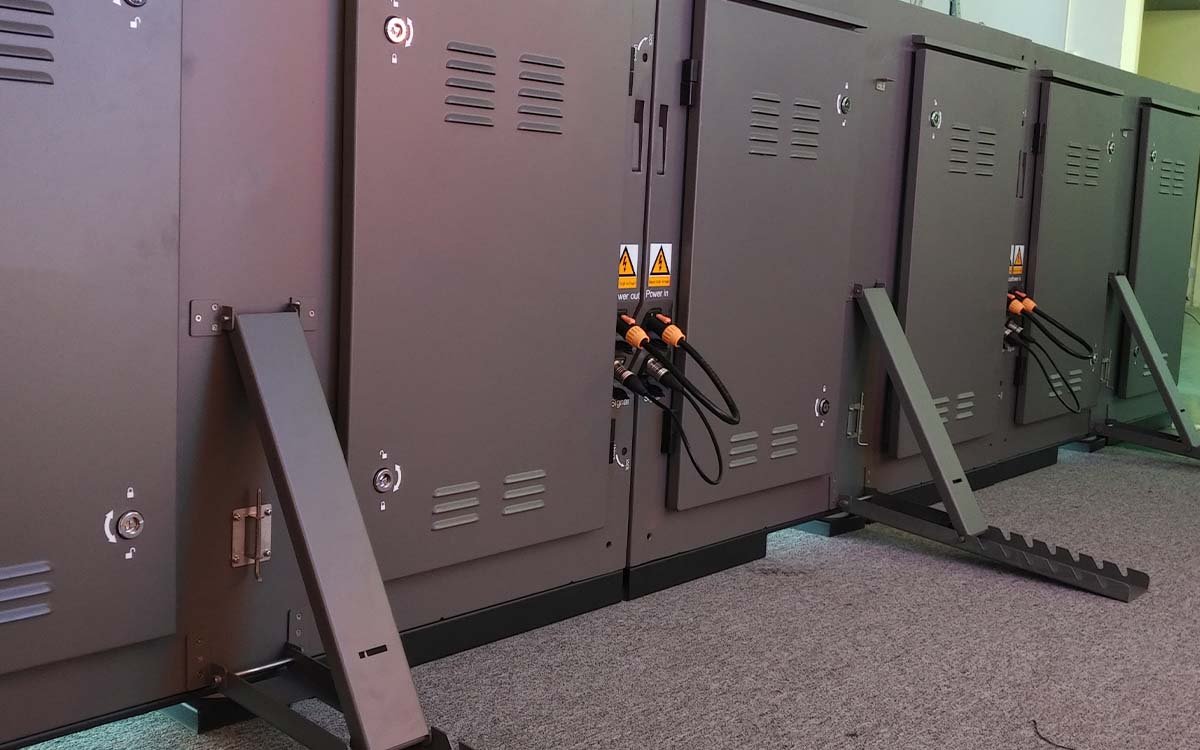
Every data line entering a perimeter cabinet passes through a waterproof gland. These glands are the weakest point in the IP65 system. A loose gland allows moisture ingress that corrodes the RJ45 or EtherCON contact. This manifests as a “random section blackout” that comes and goes with humidity. Open every cabinet and check gland tightness, then reseat all data connectors. If you see green or white corrosion on any contact, the connector has already been compromised.
Pixel Calibration and Brightness Uniformity — Bi-Annually
A stadium perimeter display ring uses dozens to hundreds of cabinets. Over time, LED lumen depreciation differs between cabinets based on thermal exposure (the cabinets facing the sun degrade faster than those in shade). The result is a patchwork of slightly different brightness levels. A camera with 1/1000s shutter and manual exposure captures this as banding — horizontal stripes where one cabinet is brighter than the next. Recalibrate the entire ring twice per year using a colorimeter-based system. This is not optional for broadcast venues.
Cooling Fan and Ventilation Path — Quarterly
Perimeter cabinets are convection-cooled or fan-cooled. Dust and grass pollen clog the intake vents and fan blades, reducing airflow. A cabinet that runs 10°C hotter than its neighbors ages at roughly double the rate. Clean fan blades and vent screens with low-pressure compressed air (≤0.3 MPa). If any fan is noisy or drawing higher current than spec, replace it immediately — a seized fan is a thermal shutdown waiting to happen.
Mounting Structure and Grounding — Annually
Stadium Perimeter display rings are mounted on brackets that absorb both static load and dynamic impact. Check for loosened bolts, metal fatigue at weld points, and corrosion on galvanized surfaces. Verify grounding continuity between every cabinet and the venue’s main earth. A floating ground creates the intermittent flicker that drives broadcast engineers insane.
Spare Parts Inventory Verification — Every 90 Days
Keep a live inventory of: LED modules (3–5% of total count), PSUs, receiving cards, data cables, soft masks, and waterproof gaskets. Verify that every spare passes a functional test before storing. A spare module that’s been sitting in a damp storage room for two years is not a spare — it’s a liability. Rotate stock using FIFO. For critical venues, keep a pre-configured “hot spare” cabinet that can be swapped in under 10 minutes.
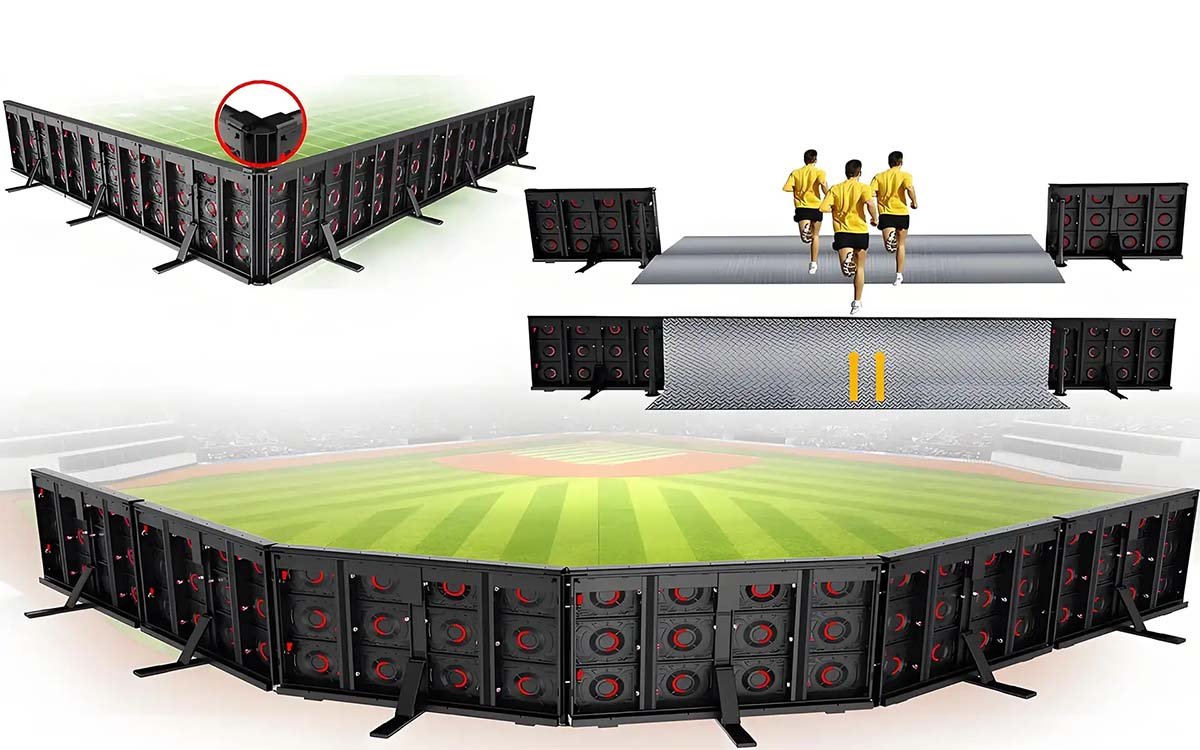
The Four Highest-Risk Components to Watch
Across the 12 checks above, four components account for the majority of unplanned failures in the field. If you have limited maintenance budget, prioritize these:
| Component | Failure Mode | Detection Method |
|---|---|---|
| Power Supply Unit | Capacitor aging → ripple → flicker or section blackout | Measure AC ripple (>100mV = replace) |
| IP65 Gasket | Compression set → moisture ingress → corrosion | Manual inspection every 90 days |
| Data Connector / Gland | Loose gland → RJ45 corrosion → intermittent blackout | Visual check for green/white corrosion |
| Soft Mask | UV hardening → loss of energy absorption → safety risk | Shore hardness test (+15% = replace) |
What “Good” Looks Like: A Real Venue Example
A 220-meter P10 perimeter ring deployed in a Western European football stadium under our venue deployment program operates on a quarterly maintenance cycle. Key metrics from its first three seasons:
- Zero unplanned broadcast-visible outages during live matches
- PSU failure rate: 0.3% per year — all detected during scheduled inspection, not during events
- Soft mask replacement: 8% of total masks over three years — only in athlete impact zones
- Brightness uniformity maintained within ±2% across the entire ring after each biannual calibration
The venue operator’s summary is the most useful data point: “The maintenance schedule costs less per year than a single lost sponsorship impression from a visible screen defect during a broadcast match.”
Key Takeaways for Venue Operators
- Perimeter LED maintenance is an electrical system schedule, not a cleaning routine.
- The four highest-risk components are: PSU ripple, seal compression set, connector corrosion, and soft mask hardening.
- Broadcast cameras amplify calibration drift that the naked eye cannot see. Calibrate on a schedule, not on complaint.
- A tested spare parts kit is not optional. It’s the difference between a 10-minute fix and a two-week shipping delay.
- Document every inspection. A maintenance log is your proof of diligence if a warranty dispute arises.
Related Reading
For deeper context on the systems and standards behind this checklist:
- How to Choose the Right Pixel Pitch for Your Stadium Display System — P6 vs P8 vs P10 explained with viewing-distance math.
- Stadium Perimeter LED system Boards vs Center-Hung Scoreboards — which surface fits which venue type.
- Why Sub-10ms Sync Matters in Live Sports Displays — the synchronization problem behind multi-screen venues.
External references:
- ICS 31.120 — LED Display Requirements for Sports Venues (China National Standard) — official definitions for refresh rate, brightness, and pixel failure rate.
- LED Perimeter Display Maintenance Schedules (LIGHTALL) — industry maintenance planning framework.
- LED Display Daily Inspection Guide (Sansitech, 2026 World Cup edition) — component-level inspection protocols for high-load events.
Need a Maintenance Audit for Your Perimeter Installation?
Send us your venue type, screen dimensions, and current maintenance cycle. We’ll come back with a gap analysis and a 12-month inspection plan tailored to your ring.
Request a Maintenance Audit